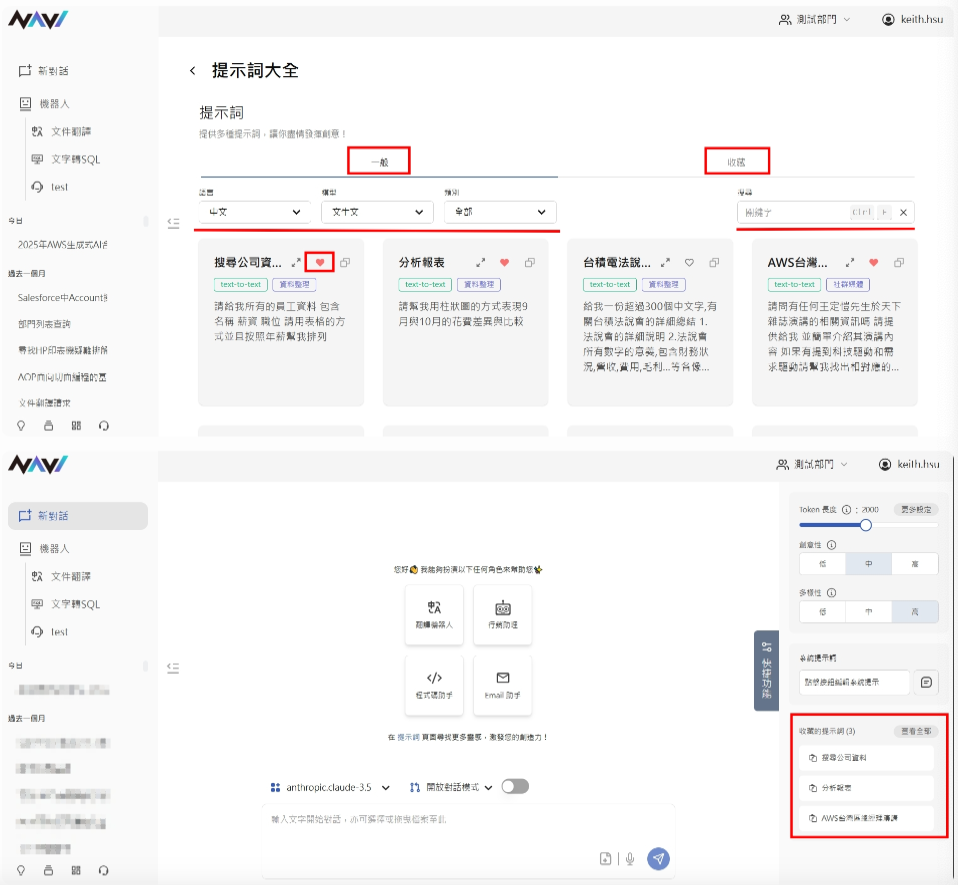
- Prompts are located in the left feature bar, second option from the left at the bottom. Clicking it gives you an overview of your organization's prompts. Well-crafted and precise prompts help users retrieve accurate information and enable the LLM to provide more accurate responses. Prompts here allow users to quickly copy prompts that have been added by an administrator.
- Prompts are organised into two sections:
| General |
|
All available prompts are displayed in this section, with multiple filtering options: Language, Model, and Category.
|
| Favorites |
| Click the heart icon on any prompt to save it to your favorites. Saved prompts will appear in the Favorites tab and will also be accessible via the "Favorited Prompts" shortcut in the bottom-right corner of the chat room. |