Many cloud migration projects run into trouble long before the first workload moves. The technology is rarely the main obstacle. More often, organizations underestimate application dependencies, overlook compliance requirements, or assume that moving virtual machines to the cloud automatically improves performance and reduces costs.
A cloud migration strategy should answer a different question: how should each workload evolve once it reaches the cloud? Some applications only need new infrastructure. Others require architectural changes, database modernization, or complete redesign.
This distinction matters because cloud migration is no longer simply about replacing on-premises servers. Enterprise environments now span containers, managed databases, SaaS platforms, AI services, and multiple cloud providers. Without a structured migration strategy, organizations risk higher operating costs, longer migration timelines, and unexpected service interruptions.
GAIA supports enterprise cloud modernization through its Cloud Computing services, helping organizations design migration roadmaps that align infrastructure decisions with long-term business goals. The company also provides implementation and consulting expertise across AWS, Microsoft Azure, Google Cloud, and Oracle Cloud environments.
What Is a Cloud Migration Strategy?
A cloud migration strategy is a structured approach for moving applications, workloads, and data from existing environments to cloud infrastructure while minimizing operational risk. Unlike a migration project plan, which focuses on schedules and individual tasks, the strategy defines what should move, when it should move, and how each workload should be modernized.
Cisco describes cloud migration as more than transferring applications between environments. Organizations should evaluate business objectives, infrastructure readiness, security requirements, and operational dependencies before selecting a migration approach. This planning stage has a direct impact on migration speed, cost, and long-term maintainability. (Cisco)
Many organizations also confuse three related concepts:
| Term | Focus | Typical outcome |
| Cloud migration strategy | Long-term direction | Migration roadmap and architecture decisions |
|
Migration plan
|
Project execution | Timeline, milestones, resources |
| Migration process |
Technical implementation
|
Moving workloads and validating systems |
Treating these as separate activities makes enterprise migrations easier to manage. A migration plan may change during the project, but the underlying strategy should remain aligned with business priorities.
Why Enterprises Move to the Cloud
Cost reduction is often cited as the primary motivation for cloud adoption, but in practice it is rarely the only—or even the biggest—driver. Many organizations migrate because their existing infrastructure limits growth, slows software delivery, or makes it difficult to support modern applications.
The business drivers usually look like this:
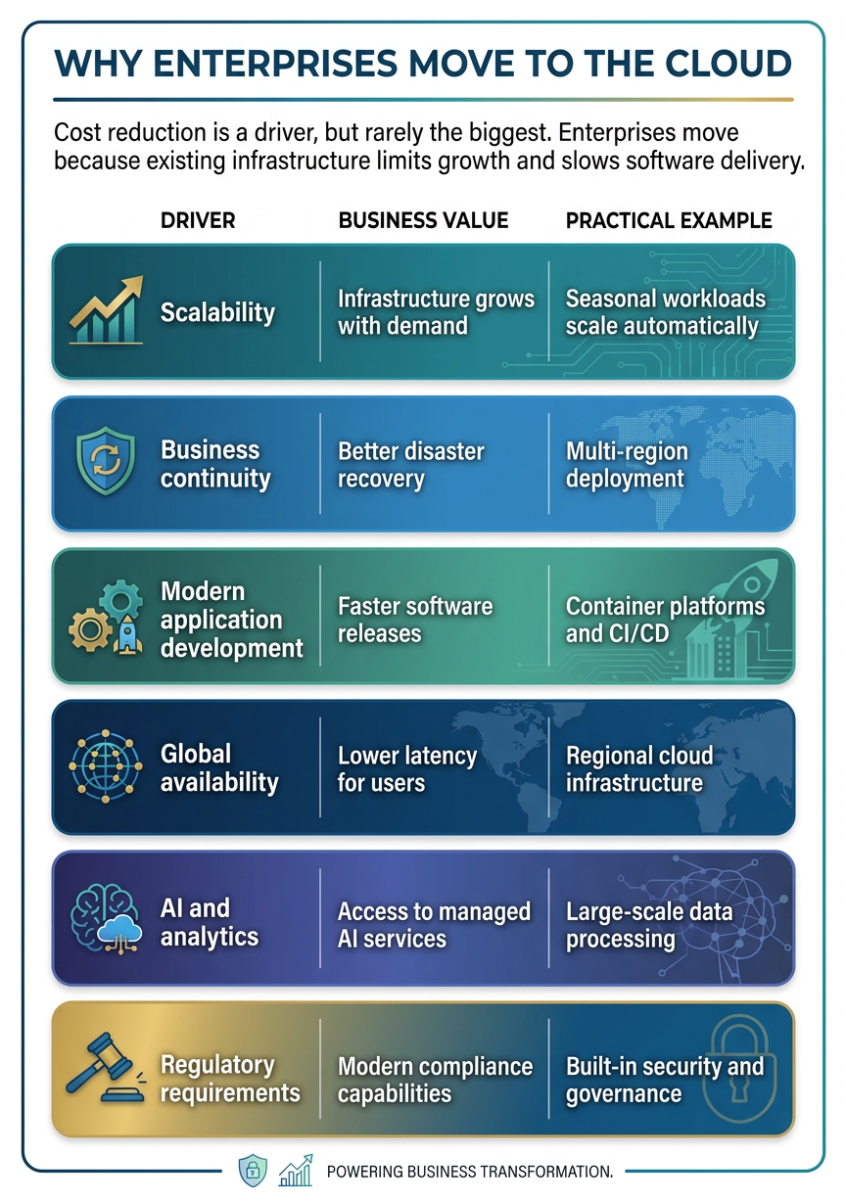
One important misconception deserves attention: cloud migration does not automatically reduce infrastructure costs.
Organizations that simply copy existing virtual machines into cloud environments—a practice often called lift-and-shift—frequently discover that operating costs increase instead of decrease. Idle instances, oversized databases, unnecessary storage tiers, and poorly optimized networking can make cloud infrastructure more expensive than on-premises environments.
Cost optimization should therefore be treated as a continuous activity after migration rather than the primary objective before it begins.
Assess Your Current Environment Before Migrating
The assessment phase is the most valuable part of a cloud migration strategy because it determines whether later architectural decisions are based on facts or assumptions.
Unfortunately, it is also the phase organizations are most likely to rush through.
Before choosing AWS, Azure, Google Cloud, Oracle Cloud, or another platform, infrastructure teams should understand exactly what they are migrating.
A comprehensive assessment normally includes:
-
application inventory;
-
infrastructure dependencies;
-
database relationships;
-
identity and access architecture;
-
network topology;
-
storage utilization;
-
compliance obligations;
-
licensing constraints;
-
business criticality.
Many enterprise applications rely on services that are not immediately visible. An internal reporting platform may depend on a legacy authentication service, shared storage, or nightly batch jobs running elsewhere in the environment. Migrating only the application without these dependencies can create outages that are difficult to diagnose.
Dependency mapping should therefore include both technical relationships and operational ones.
For example:
| Assessment area | Questions to answer |
| Applications | Which systems depend on each other? |
|
Data
|
Where is sensitive information stored? |
| Network |
Which services require low latency?
|
| Security | Which compliance frameworks apply? |
| Operations | Which workloads require 24/7 availability? |
This stage is also where organizations identify applications that should not move to the cloud immediately. Some legacy systems remain tightly coupled to specialized hardware, proprietary licensing models, or latency-sensitive environments. Keeping these workloads on-premises temporarily can reduce project risk while modernization efforts continue elsewhere.
Another useful exercise is workload classification. Instead of treating every application equally, divide systems into categories such as:
-
business-critical production;
-
customer-facing services;
-
internal applications;
-
development and testing;
-
archival systems;
-
workloads scheduled for retirement.
This makes later migration decisions significantly easier because not every application deserves the same investment.
Choosing the Right Migration Strategy
Once the current environment has been assessed, the next decision is choosing how each workload should move. There is no universal migration method. Different applications often require different approaches, even within the same migration program.
Most cloud providers structure this decision around the 7Rs migration framework: Rehost, Replatform, Refactor (or Re-architect), Repurchase, Relocate, Retain, and Retire. The framework is useful because it encourages teams to evaluate every application individually instead of applying the same migration pattern across the entire portfolio.
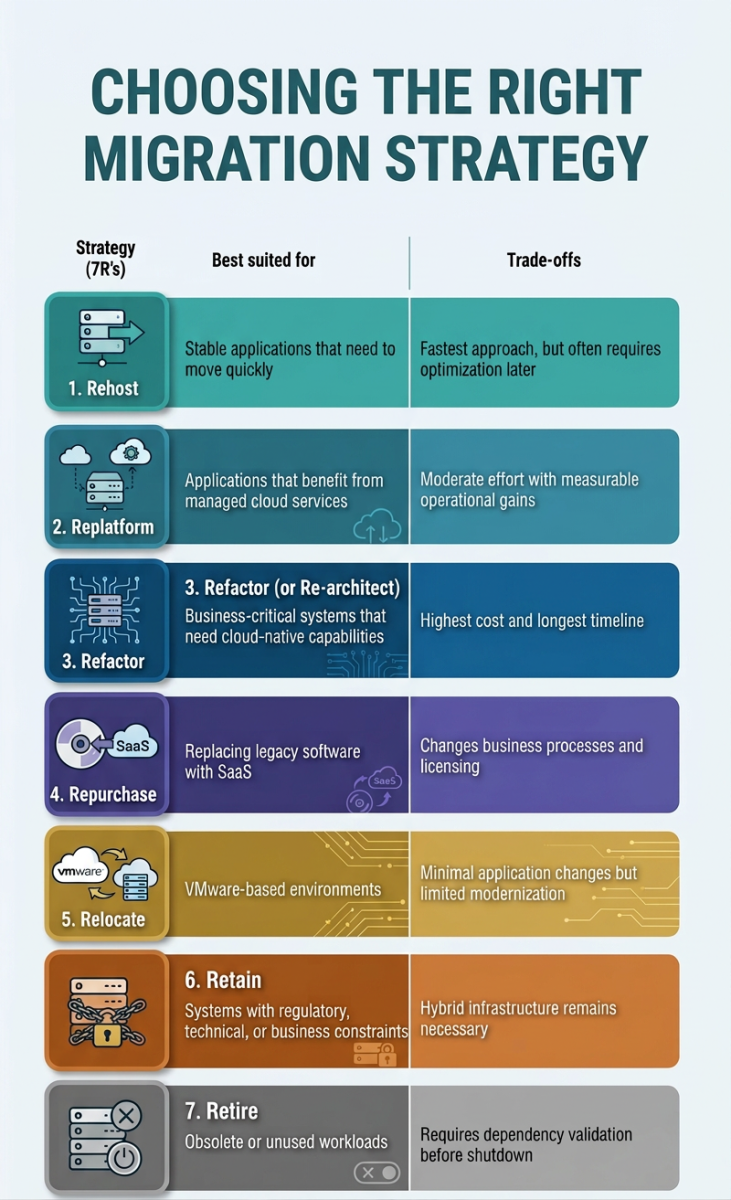
One of the biggest mistakes enterprises make is assuming that Refactor is always the “best” strategy because it delivers the most modernization. In reality, AWS recommends using rehosting, relocating, or replatforming for many large migration programs and modernizing applications after the migration, once operational stability has been established. Trying to refactor dozens of applications during the migration itself often increases project risk without accelerating business value.
Instead of asking “Which strategy is best?”, ask:
-
Which workloads generate the highest business value?
-
Which applications are approaching end-of-life?
-
Which systems prevent future modernization?
-
Which workloads must migrate with minimal downtime?
The answers will usually point to a mix of strategies rather than a single migration pattern.
A Step-by-Step Cloud Migration Process
Enterprise migrations succeed when they move in controlled phases rather than treating migration as one large technical project. While every organization has different priorities, most successful migration programs follow the same sequence.
Step 1. Define business objectives
Migration should begin with measurable business outcomes—not infrastructure targets.
For example:
-
exit a data center before a lease expires;
-
improve disaster recovery;
-
reduce deployment time;
-
support global expansion;
-
prepare applications for AI workloads;
-
simplify infrastructure operations.
These objectives influence every architectural decision that follows.
Step 2. Build the cloud landing zone
Before migrating applications, establish the cloud environment they will run in.
A production-ready landing zone typically includes:
-
identity and access management (IAM);
-
networking and segmentation;
-
logging and monitoring;
-
backup policies;
-
encryption standards;
-
cost allocation and tagging;
-
governance policies.
Skipping this step often creates inconsistent environments that become harder to manage as migration progresses.
Step 3. Run a pilot migration
Avoid moving mission-critical systems first.
Choose an application that:
-
has limited dependencies;
-
represents a typical workload;
-
has a realistic rollback option;
-
allows the team to validate migration tools and operational processes.
Pilot migrations often reveal networking assumptions, DNS issues, identity integration problems, or monitoring gaps that would otherwise affect larger migration waves.
Step 4. Migrate data before applications
For many enterprise systems, data migration is more difficult than application migration.
Questions that should already have answers include:
-
How much downtime is acceptable?
-
Will databases replicate continuously or require scheduled cutover?
-
How will consistency be verified?
-
What happens if synchronization fails?
Applications can usually be redeployed. Recovering inconsistent production data is considerably harder.
Step 5. Validate production readiness
Migration is not complete when workloads start successfully.
Validation should confirm:
| Validation area | Questions to verify |
| Performance | Does latency meet production requirements? |
|
Security
|
Are IAM policies functioning correctly? |
| Monitoring |
Are logs, metrics, and alerts available?
|
| Security | Can systems actually be restored? |
| User experience | Can business processes complete normally? |
This stage frequently uncovers issues that infrastructure testing alone cannot detect, particularly around integrations with external systems.
Step 6. Optimize after migration
Many teams try to optimize infrastructure before migration.
In practice, optimization works better after workloads stabilize.
Only then can engineering teams answer questions like:
-
Are instances oversized?
-
Can managed services replace self-hosted components?
-
Would containers reduce operational overhead?
-
Are storage classes appropriate?
-
Are networking costs higher than expected?
Cloud migration and cloud optimization are related but different initiatives. Combining them into one large project usually slows both.
Security Should Be Built Into the Migration Strategy
Security decisions made during migration often remain in place for years. Treating security as a post-migration task usually results in inconsistent identity policies, excessive permissions, and weak operational visibility.
Enterprise migration projects should establish security controls before production workloads move.
That includes:
-
role-based identity management;
-
encryption for data at rest and in transit;
-
network segmentation;
-
secrets management;
-
centralized logging;
-
continuous vulnerability assessment;
-
Zero Trust principles.
NIST’s guidance on Zero Trust Architecture recommends continuously verifying identities and limiting implicit trust rather than relying on traditional network boundaries. Those principles apply equally during cloud migration because applications often operate across hybrid environments for months before migration is complete.
Security reviews should also include third-party integrations, legacy service accounts, and application credentials. These components are frequently overlooked during migration planning but become some of the largest sources of operational risk after cutover.
Choosing the Right Cloud Platform
The best cloud provider is the one that aligns with your existing technology stack, operational model, compliance requirements, and long-term roadmap. There is no universal “best cloud.” A platform that fits a data-intensive analytics environment may be the wrong choice for a business built around Microsoft services or Oracle databases.
Enterprise migration projects should evaluate providers using several criteria:
-
existing application dependencies;
-
in-house engineering expertise;
-
managed service availability;
-
regional presence and data residency;
-
licensing considerations;
-
disaster recovery requirements;
-
AI and analytics capabilities;
-
long-term operational costs.
| Platform | Best suited for | Typical strengths |
| AWS | Large-scale enterprise workloads | Broadest service portfolio, mature migration ecosystem |
| Microsoft Azure | Organizations using Microsoft technologies | Strong integration with Active Directory, Microsoft 365, SQL Server |
| Google Cloud |
Data-intensive and AI-driven workloads
|
Analytics, Kubernetes, AI and machine learning services
|
| Oracle Cloud Infrastructure | Oracle applications and enterprise databases | High-performance Oracle Database services and enterprise workloads |
Rather than choosing a provider based solely on market share, compare how well its services support your existing architecture and future business plans.
For organizations evaluating multiple platforms, GAIA provides infrastructure expertise across Cloud Computing, AWS, Azure, Google Cloud, and Oracle Cloud, helping enterprises select the environment that best matches workload requirements instead of forcing every application onto a single platform.
Some practical considerations include:
-
If your organization relies heavily on Microsoft technologies such as Windows Server, Active Directory, SQL Server, and Microsoft 365, Azure often reduces integration effort.
-
Organizations building cloud-native applications around containers, serverless computing, or a broad range of managed services frequently choose AWS because of its mature ecosystem.
-
Companies investing heavily in analytics, machine learning, and Kubernetes often evaluate Google Cloud, particularly where data processing is a strategic priority.
-
Enterprises running large Oracle estates may benefit from Oracle Cloud Infrastructure, which offers optimized support for Oracle databases and enterprise applications. Oracle’s Cloud Migrations service, for example, includes workload discovery, migration planning, replication, and automated migration workflows for VMware environments and AWS EC2 instances.
The platform decision should come after workload assessment—not before it.
Common Cloud Migration Mistakes
Cloud migration projects rarely fail because of a lack of technology. More often, problems appear because planning assumptions prove incorrect once production workloads begin to move.
Several mistakes appear consistently across enterprise migration programs.
Treating every application the same
Not every workload requires modernization.
Some systems benefit from refactoring. Others are better candidates for rehosting, while legacy applications with limited business value may be scheduled for retirement.
Applying one migration strategy to every application usually increases both cost and project duration.
Ignoring application dependencies
Applications rarely operate in isolation.
Authentication services, shared databases, file systems, message queues, scheduled jobs, third-party APIs, and reporting platforms often introduce hidden dependencies.
Missing even one critical dependency can delay production cutover or create outages that are difficult to troubleshoot.
Focusing only on infrastructure
Migrating virtual machines is only part of the project.
Teams also need to validate:
-
business workflows;
-
user authentication;
-
monitoring;
-
backups;
-
disaster recovery;
-
integrations;
-
security policies.
Infrastructure migration without operational validation simply moves existing problems into a new environment.
Assuming cloud automatically lowers costs
One of the most common misconceptions is that moving to cloud infrastructure guarantees immediate savings.
Lift-and-shift migrations often increase monthly spending because workloads remain oversized, storage is not optimized, and cloud-native services are not adopted.
Optimization should continue after migration through rightsizing, autoscaling, storage lifecycle policies, and ongoing cost monitoring.
Skipping rollback planning
Every production migration should include a rollback strategy.
Questions worth answering before migration include:
-
What triggers rollback?
-
How long can rollback take?
-
Is data synchronization reversible?
-
Who approves rollback?
-
What business impact is acceptable?
Rollback plans are rarely used—but when they are needed, they become the most important document in the migration project.
Cloud Migration Best Practices
Successful migration programs share several characteristics regardless of industry or cloud provider.
Build the landing zone first
Identity, networking, monitoring, logging, governance, and security controls should already exist before production applications move.
Retrofitting governance later is considerably harder.
Migrate business capabilities, not individual servers
Users care whether business processes continue working—not where virtual machines are running.
Whenever possible, migrate complete business services rather than isolated infrastructure components.
Automate wherever practical
Infrastructure as Code, automated testing, deployment pipelines, and configuration management reduce manual effort while improving consistency across environments.
Automation also makes rollback, disaster recovery, and future expansion easier.
Validate under realistic workloads
Infrastructure testing should simulate production conditions.
That includes:
-
expected traffic volumes;
-
authentication flows;
-
API integrations;
-
reporting jobs;
-
scheduled processes;
-
backup and recovery scenarios.
Migration projects often pass technical testing but fail during the first production peak because realistic workloads were never evaluated.
Continue optimizing after migration
Migration is not the finish line.
Cloud environments evolve continuously as applications change, business requirements grow, and managed services improve.
Regular reviews should evaluate:
-
infrastructure utilization;
-
storage lifecycle;
-
database performance;
-
network architecture;
-
operational costs;
-
security posture.
Organizations that treat migration as an ongoing modernization program generally achieve better long-term results than those viewing it as a one-time infrastructure project.
Final Thoughts
A successful cloud migration strategy is not measured by how quickly workloads leave the data center. It is measured by how reliably those workloads operate after migration and how well the new environment supports future business goals.
That requires more than moving infrastructure. It requires understanding application dependencies, selecting the right migration strategy for each workload, building secure landing zones, validating production readiness, and continuing to optimize after the initial cutover.
The most effective enterprise migrations rarely follow a single template. Some applications are rehosted, others are replatformed, and a smaller group may be fully refactored over time. Choosing the right approach for each workload reduces both technical risk and unnecessary spending.
GAIA helps organizations plan and execute cloud migrations across Cloud Computing, AWS, Azure, Google Cloud, and Oracle Cloud, designing architectures that balance performance, security, scalability, and long-term operational efficiency. Whether you’re moving a small application portfolio or modernizing enterprise infrastructure across multiple environments, the migration strategy should always come before the migration itself.

NEW eBook Alert!
The Agentic AI Era: Reshaping the Future of Games
Discover how AI agents are transforming game development, user acquisition, and operations.